Emacsを使っていると、日本語入力との付き合い方に少し悩むことがあります。
特に C-x や M-x を押した直後に、日本語入力のままになっていて「あ、切り替え忘れた」と気づく場面が何度もありました。
1. Karabiner-Elementsでルール
使ったのは Karabiner-Elements です1。
macOSでキーボード入力を条件付きで変換できるツールで、「特定のアプリが前面のときだけ有効」といった指定もできます2。
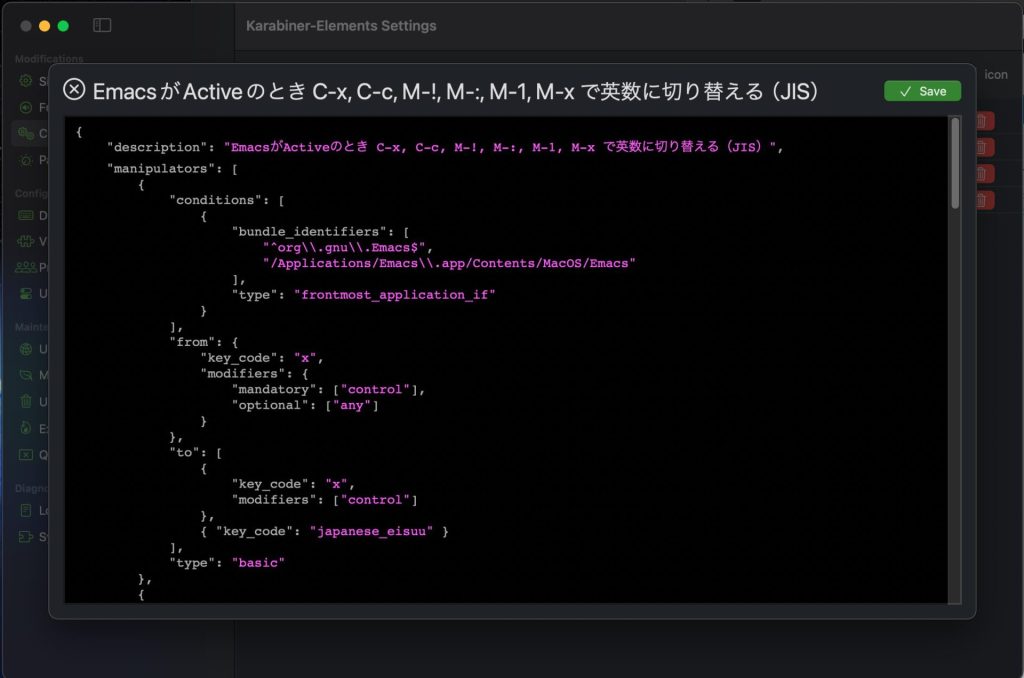
{
  "description": "EmacsがActiveのとき C-x, C-c, M-!, M-:, M-1, M-x で英数に切り替える(JIS)",
  "manipulators": [
    {
      "type": "basic",
      "conditions": [
        {
          "type": "frontmost_application_if",
          "bundle_identifiers": [
            "^org\\.gnu\\.Emacs$",
            "/Applications/Emacs\\.app/Contents/MacOS/Emacs"
          ]
        }
      ],
      "from": {
        "key_code": "x",
        "modifiers": { "mandatory": ["control"], "optional": ["any"] }
      },
      "to": [
        { "key_code": "x", "modifiers": ["control"] },
        { "key_code": "japanese_eisuu" }
      ]
    },
    {
      "type": "basic",
      "conditions": [
        {
          "type": "frontmost_application_if",
          "bundle_identifiers": [
            "^org\\.gnu\\.Emacs$",
            "/Applications/Emacs\\.app/Contents/MacOS/Emacs"
          ]
        }
      ],
      "from": {
        "key_code": "c",
        "modifiers": { "mandatory": ["control"], "optional": ["any"] }
      },
      "to": [
        { "key_code": "c", "modifiers": ["control"] },
        { "key_code": "japanese_eisuu" }
      ]
    },

    {
      "type": "basic",
      "conditions": [
        {
          "type": "frontmost_application_if",
          "bundle_identifiers": [
            "^org\\.gnu\\.Emacs$",
            "/Applications/Emacs\\.app/Contents/MacOS/Emacs"
          ]
        }
      ],
      "from": {
        "key_code": "1",
        "modifiers": { "mandatory": ["option"], "optional": ["any"] }
      },
      "to": [
        { "key_code": "1", "modifiers": ["option"] },
        { "key_code": "japanese_eisuu" }
      ]
    },
    {
      "type": "basic",
      "conditions": [
        {
          "type": "frontmost_application_if",
          "bundle_identifiers": [
            "^org\\.gnu\\.Emacs$",
            "/Applications/Emacs\\.app/Contents/MacOS/Emacs"
          ]
        }
      ],
      "from": {
        "key_code": "x",
        "modifiers": { "mandatory": ["option"], "optional": ["any"] }
      },
      "to": [
        { "key_code": "x", "modifiers": ["option"] },
        { "key_code": "japanese_eisuu" }
      ]
    },

    {
      "type": "basic",
      "conditions": [
        {
          "type": "frontmost_application_if",
          "bundle_identifiers": [
            "^org\\.gnu\\.Emacs$",
            "/Applications/Emacs\\.app/Contents/MacOS/Emacs"
          ]
        }
      ],
      "from": {
        "key_code": "semicolon",
        "modifiers": { "mandatory": ["option"], "optional": ["any"] }
      },
      "to": [
        { "key_code": "semicolon", "modifiers": ["option"] },
        { "key_code": "japanese_eisuu" }
      ]
    },
    {
      "type": "basic",
      "conditions": [
        {
          "type": "frontmost_application_if",
          "bundle_identifiers": [
            "^org\\.gnu\\.Emacs$",
            "/Applications/Emacs\\.app/Contents/MacOS/Emacs"
          ]
        }
      ],
      "from": {
        "key_code": "1",
        "modifiers": { "mandatory": ["option", "shift"], "optional": ["any"] }
      },
      "to": [
        { "key_code": "1", "modifiers": ["option", "shift"] },
        { "key_code": "japanese_eisuu" }
      ]
    }
  ]
}
Code language: JSON / JSON with Comments (json)今回やりたかったのは、Emacsがアクティブな状態でC-x / C-c / M-x / M-: / M-! / M-1
を押したら、その操作はそのまま通しつつ、入力モードだけを英数に戻す。
キーの挙動を変えずに、「おまけで英数キーを送る」イメージです。
Emacsのみの設定にするため、条件には、Emacsの bundle identifier を使いました3。
org.gnu.Emacs
/Applications/Emacs.app/Contents/MacOS/Emacs
M-x は option + x、M-: は option + ;、M-! は option + shift + 1 という対応になります(JIS配列前提です)4。
Karabiner-Elementsに依存する以上、環境が変わると再調整が必要です。
それでも、Emacsと日本語入力の間にある微妙なズレを、自分なりに調整できた点には満足しています。
- Karabiner-ElementsはmacOS用のオープンソースキーボードカスタマイズツールで、Intel MacとApple Silicon Macの両方をサポートしています。開発者のTakayama Fumihiko氏によって継続的にメンテナンスされており、GitHubで公開されています。 – Karabiner-Elements公式サイト
- Karabiner-Elementsでは、Simple Modifications(シンプルなキーマッピング)とComplex Modifications(複雑なルール設定)の2種類の設定方法があり、JSONファイルで詳細な条件付きルールを記述できます。 – Karabiner-Elements導入と基本的な使い方 – Qiita
- bundle identifierはmacOSアプリケーションを一意に識別する文字列です。
org.gnu.EmacsはGNU Emacsの標準的なbundle identifierで、Karabiner-Elementsのfrontmost_application_if条件でアプリケーションを特定する際に使用します。 – 快適キーボード操作のためのキーカスタマイズ~Mac編~ – さくらのナレッジ - EmacsのMetaキー(M-)はmacOSではOptionキーに対応します。JIS配列とUS配列ではキー配置が異なるため、記号キーのマッピングも変わります。この設定はJIS配列を前提としており、US配列では異なる設定が必要です。 – MacでWindowsキーボードを使う!Karabiner-Elementsの設定法